
Small real estate agencies lose leads in Excel for six reasons: a row has no clear owner, nothing alerts anyone when a follow-up date passes, the same phone number gets added twice under different names, portal enquiries sit in email until someone pastes them in, every remark overwrites the last so no lead has a history, and one shared file gets copied until nobody knows which version is current. A CRM move fixes all six in about a week: clean the sheet, bulk-import it with assignment rules applied, connect the portals so new enquiries arrive on their own, and run every morning from an overdue list instead of a colour-coded column.
Key takeaways
- Excel does not lose leads at entry; it loses them between entry and the second call, where nobody is told to act.
- Clean before you import: one row per phone number, one status vocabulary, a source on every row.
- Import with per-row results and round-robin assignment so day one ends with zero unowned leads.
- Connect 99acres, MagicBricks, Housing.com and Meta Lead Ads through webhooks and stop copy-pasting.
- Run the team from an overdue list and a first-response timer, not from the sheet.
Where does an Excel sheet actually lose real estate leads?
The entry stage is rarely the problem. Most agencies are good at writing down a name and a number. Leads go missing in the gap between the first entry and the second contact, because a spreadsheet records facts but never pushes anyone to act on them. Here are the six places where that gap opens.
No owner on the row
A sheet has an "Assigned to" column only if someone remembers to fill it. On a busy Monday after a weekend of portal enquiries, twenty rows get added and the column stays blank. Each telecaller assumes someone else has it. Three days later the buyer has booked a site visit with another broker in Wakad. In a CRM, a lead cannot exist without an owner if assignment rules run at creation; the blank column stops being possible.
No reminder when the follow-up date passes
"Call back Thursday" written in a cell does nothing on Thursday. The telecaller has to open the sheet, filter the date column, and remember to do that before the day fills with inbound calls. Any day she forgets, every Thursday follow-up slides to Friday, then to never. The mechanism a CRM adds is simple: the date triggers a notification to the owner, and overdue follow-ups appear in a list that gets longer until someone clears it.
Duplicates nobody notices
The same buyer enquires on 99acres on Monday, on Housing.com on Wednesday, and walks into the office on Saturday. In the sheet he is three rows with three slightly different names ("Rahul S", "Rahul Sharma", "Mr. Sharma") and possibly three different telecallers quoting three different prices. He concludes the agency is disorganised, and he is right. A phone-number check at the moment of entry is the fix, together with a view that links the repeats to the original so the history stays in one place.
Portal leads pasted in late
Portal enquiries arrive as emails or inside the portal's own panel. Someone copies them into the sheet once or twice a day. The buyer who enquired at 9:40 am gets a call at 6 pm, after four other brokers listed on the same project have already called. Speed on portal leads is almost entirely a function of how the lead reaches the person who will call, and copy-paste is the slowest path there is.
No history, so every handover starts from zero
A cell holds one line of remarks. The call on the 3rd, the WhatsApp on the 7th, the budget correction on the 10th, all end up as "spoke, will revert" overwritten each time. When the telecaller leaves, the next person inherits a number and a status, not a conversation. A timeline per lead is what makes a handover a continuation rather than a restart.
One file, many hands
Shared sheets get copied. The version on the owner's laptop, the one in the telecalling WhatsApp group and the one in Google Drive drift apart within a week. Nobody knows which is current, and a departing employee walks out with a complete copy of the database on their phone. Role-based access, where each person sees only their own or their team's leads, is as much a data-safety fix as a sales one.
Can a better spreadsheet fix this instead of a CRM?
For one or two people handling fewer than a hundred leads a month, a disciplined sheet with conditional formatting on the follow-up column works, and the honest advice is to keep it until it breaks. It breaks at two points: when more than one person works the same leads, and when portals send more enquiries than can be pasted the same day. Beyond those points the fixes below are patches on a structural problem.
| Problem | Spreadsheet patch | What it still misses | What a CRM does differently |
|---|---|---|---|
| Unowned rows | Data-validation dropdown for owner | Nothing forces the dropdown to be filled | Assignment rule runs at creation; every lead has an owner |
| Missed follow-ups | Conditional formatting turns overdue cells red | Only visible if the sheet is open and filtered | Reminder pushed to the owner's phone; overdue list for the manager |
| Duplicates | COUNTIF on the phone column | Runs after entry, misses formatting differences (+91, spaces) | Duplicate check on the phone number at entry, repeats linked to the original |
| Late portal leads | A person pastes twice a day | Speed depends on that person's day | Webhook delivers the enquiry in real time, source recorded |
| Lost history | A long remarks cell | Overwritten; no dates, no who | Timeline of notes, calls and messages with timestamps |
| Shared-file chaos | "Master copy" rule | Copies still leak; no record of edits | Role scopes and an audit log of who changed what |
How do you move from Excel to a CRM in one week?
The plan below is written for a typical small agency. Illustrative example: a six-person firm in Pune, three telecallers, two field executives and the owner, with about 4,200 rows spread across three sheets ("Leads 2025", "Hinjewadi Project", "Old Data"). Adjust the days to your size; the sequence matters more than the speed.
Day 1: freeze the sheets and clean them
Announce that no new rows go into Excel from tomorrow. Then merge the three sheets into one and clean it:
- One column each for name, phone, email, source, status, assigned to, budget, locality, property type, last remark and next follow-up date.
- Phone numbers as 10 digits: strip +91, leading 0, spaces and hyphens. Sort by the phone column and look at the pairs; decide which row survives and move the other's remarks into it.
- One status vocabulary. Replace "intrstd", "Interested" and "INT" with a single value. Five to eight statuses are enough: New, Contacted, Interested, Site Visit Scheduled, Site Visit Done, Negotiation, Booked, Dropped.
- A source for every row. If you do not know, write "Unknown" rather than leaving it blank; you will want to compare sources later.
- Budget as a number in lakh (45, 72, 110), not "45-50L approx".
- Dead rows: anything older than a year with no remark goes into a separate "Cold" sheet. Import it separately so it does not clutter the live pipeline.
Day 2: import with the template and read the per-row results
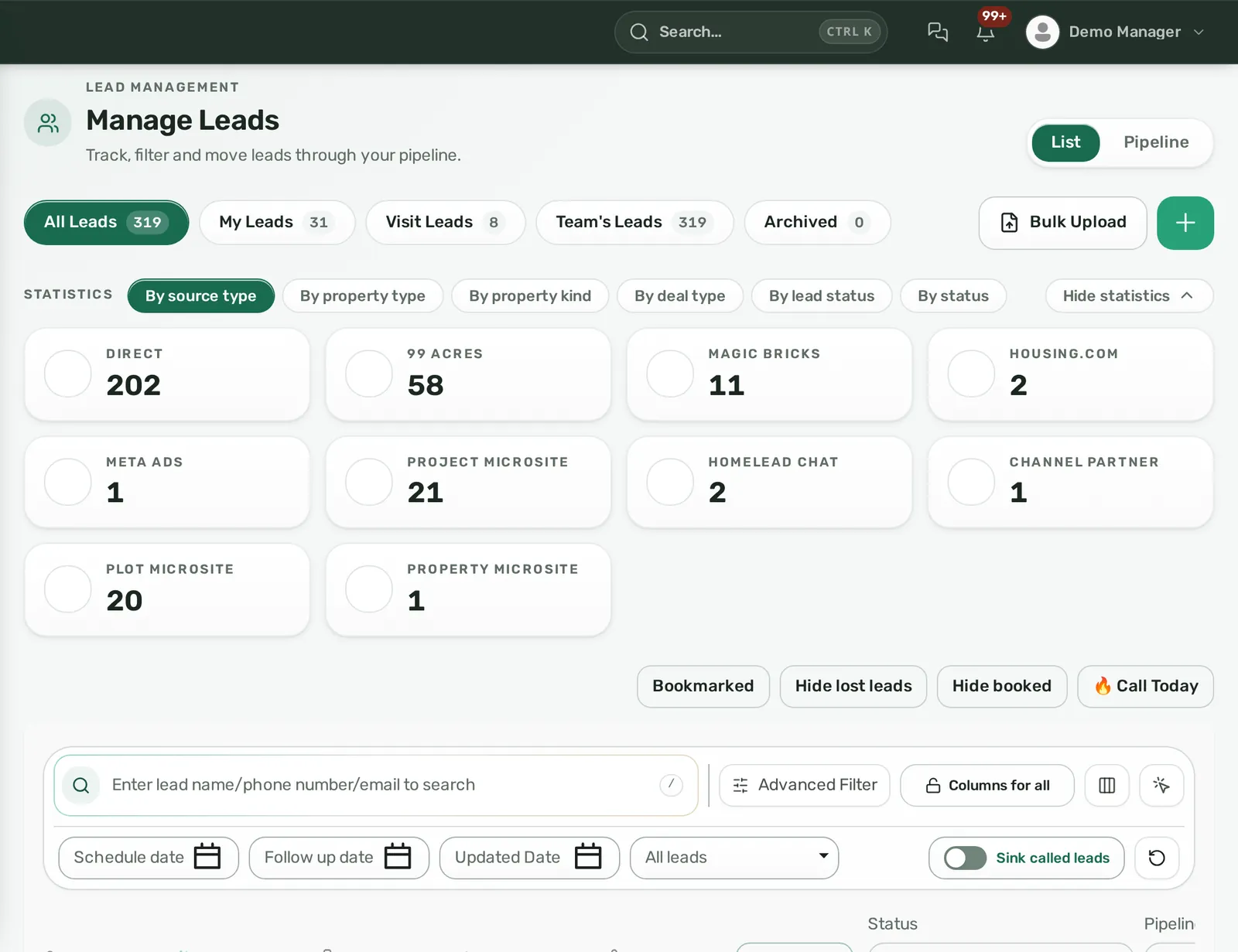
Download the CRM's sample import template, paste your cleaned columns under its headers and run the import. Do not import 4,200 rows blind. Run the first 50 as a test, open five of them, and check that budget, source and follow-up date landed in the right fields. Then run the rest.
Read the per-row result properly. Rows that fail usually fail for one of three reasons: a phone number with nine digits, a date in a format the importer did not recognise, or a status value you forgot to standardise. Fix those rows in the sheet and re-import only the failures.
Day 3: set assignment rules so nothing is unowned
Assignment is the single biggest change from Excel, so decide it deliberately:
- Round robin across the three telecallers for portal and website leads.
- Parameter-based for anything with a known locality: Kharadi and Hadapsar enquiries to the executive who covers the east, Baner and Hinjewadi to the west.
- A daily cap per person so a flood of ad leads does not bury one telecaller.
If your importer can assign while importing, use it for the cleaned backlog so day three ends with zero unowned leads. For the logic behind these strategies, see the guide to lead assignment software for real estate.
Day 4: connect portals and ads so leads stop being pasted
Ask the CRM for the webhook URL and key for each portal, then ask your 99acres, MagicBricks and Housing.com account managers to enable the push. Do the same for Meta Lead Ads through the page connection and for your website form. Send a test enquiry from each and confirm it arrives with the right source and lands on the right person. From this day, the only reason to open a portal panel is to manage listings. The step-by-step is in our article on 99acres, MagicBricks and Housing.com lead integration.
Day 5: set follow-up discipline and the response-time clock
Two rules, written down and shown to the team:
- Every call ends with a note and a next follow-up date, even if the date is three months away. A lead with no next date is treated as a mistake, not a status.
- A fresh lead gets a first call within a set number of minutes. Thirty is a good target for portal leads during working hours; set the CRM's first-response timer to that, with escalation to the manager on breach.
Pick the reminder channels the team will actually see (phone push, in-app bell, Telegram if the team already lives there) and switch them on. The broader system is covered in our guide to a real estate lead follow-up system.
Day 6 and 7: run the morning from the overdue list
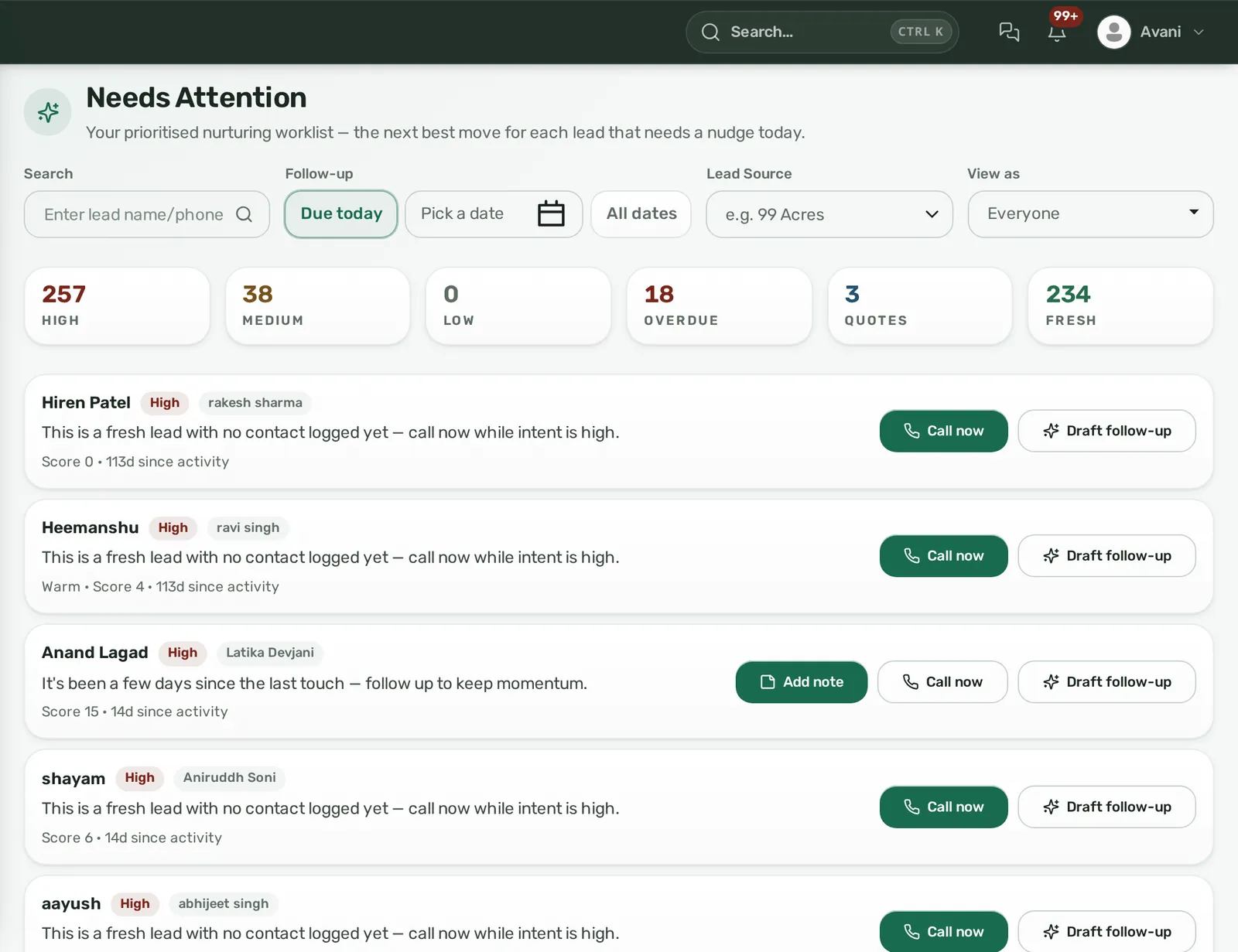
Replace the "open the sheet and filter" habit with a fixed ten-minute stand-up around one screen: overdue follow-ups, leads with no first contact, and hot leads. Each telecaller clears their overdue list before taking new calls. The owner looks at the same list by team and asks about anything older than three days. After two mornings of this, nobody misses the sheet.
What should the first 30 days after the move look like?
- Week 1: everyone works only in the CRM. The Excel file is read-only and stays that way; archive it after a month.
- Week 2: review the lead-source report. You will see, probably for the first time, which portal sends leads that actually book site visits versus leads that never pick up. Shift listing spend accordingly.
- Week 3: review assignment. Check the rotation log for leads that went to the wrong person and tighten the parameter rules.
- Week 4: set permissions properly. Telecallers see their own leads, team leads see their team, the owner sees all. Switch exports off for anyone who does not need them. Set up the offboarding step (transfer all leads to a successor) before you need it.
Treat the first month's numbers as a baseline, not a verdict. Conversion will not jump in thirty days; what changes immediately is the number of leads with no owner and no next date, which should be zero by week two.
How Homelead handles the Excel-to-CRM move
Homelead's bulk import takes Excel or CSV against a downloadable sample template, matches columns tolerantly (so "Mobile" and "Phone No." both land in the phone field), and returns a per-row success or fail result with the reason. A file can hold up to 50,000 rows. You can round-robin assign while importing, so the cleaned backlog lands with an owner on every lead.
Duplicates are checked live on the phone number when a lead is added, and repeats are flagged "duplicate" and linked to the original rather than silently dropped; a merge keeps both histories.
Portal webhooks are included in every plan for 99acres, MagicBricks, Housing.com, PropTiger, Square Yards and OLX, plus Meta Lead Ads, website forms, microsite forms and a generic webhook for anything else. Every lead carries a source and sub-source, and the lead-source report shows volume, conversion percentage and hot percentage per source.
Assignment supports five strategies per source (round robin, percentage split, capacity balance, fixed daily cap, parameter-based) with a Rotation Log showing why each pick fired. A first-response SLA (default 60 minutes, settable from 1 to 1,440) warns before the deadline and on breach can notify the assignee, escalate to the reporting manager, flag the lead red or auto-reassign.
Follow-up dates set on a note trigger reminders by in-app bell, phone push and Telegram. The Needs Attention screen ranks in-scope leads by rule (fresh with no contact, overdue, missed follow-up, quotation waiting) from high to low with a Next Best Action and its reason. Visibility is My/Team/All by reporting line, and offboarding moves every lead to a successor in one action. Plans start from 10 users; details are on the pricing page and in our note on per-user CRM pricing. To see the import and portal setup on your own sheet, book a demo at https://homelead.com/#demo or WhatsApp +91 72400 44472 and send your inventory sheet beforehand.
Mistakes agencies make when they move off Excel
- Importing the dirty sheet "to fix later". It never gets fixed; the duplicates and blank sources follow you for a year.
- Keeping Excel as a parallel system. If the owner still asks for the sheet on Friday, the team maintains both and trusts neither.
- Building twenty statuses. Telecallers stop choosing accurately past about eight.
- Connecting portals but not testing with a real enquiry, then discovering a month later that one portal never pushed.
- Giving everyone admin. Scopes exist so a departing telecaller cannot export the database.
- Treating the CRM as a reporting tool for the owner instead of a work tool for the team. If the telecaller's day does not get easier, adoption dies in three weeks.
Frequently asked questions
How long does it take to move real estate leads from Excel to a CRM?
About a week for a small agency: one day to clean, one to import and check, one to set assignment, one to connect portals and ads, one for follow-up rules, and two mornings of running the team from the overdue list. Cleaning the sheet is the only slow part.
Should I import old leads or only live ones?
Import both, but separately. Live leads (any contact in the last 6 to 12 months) go into the main pipeline with owners. Older rows go into a cold-lead section so telecallers can work them in slack time without cluttering the daily list.
How do I stop duplicate leads when the same buyer enquires on several portals?
Standardise phone numbers to 10 digits before import, and use a CRM that checks the phone number at entry and links repeats to the original rather than dropping them. That way the history of all three enquiries sits on one lead.
Can portal leads really arrive without anyone pasting them?
Yes. 99acres, MagicBricks and Housing.com can push each enquiry to a webhook URL the CRM gives you; your portal account manager enables it once. After that the lead appears in real time with its source recorded.
What is the first metric to watch after the move?
The number of leads with no owner or no next follow-up date. It should be zero within two weeks. Conversion rate follows later; response time and overdue count are the leading indicators.
Will my telecallers resist the change?
They resist if the CRM adds work. Keep statuses few, let follow-up dates pre-fill sensibly, and make the morning overdue list shorter than their old filter routine. When the tool saves them the Monday paste job, adoption takes care of itself.