A real estate agent performance dashboard shows, for each agent, how quickly new leads are answered, how many follow-ups are overdue or missed, how many site visits were booked and completed, which lead sources that agent converts, and how booked revenue compares with target. For a Dubai brokerage the useful version is role-scoped (an agent sees only their own numbers, a team lead sees the team, the owner sees everyone) and reads from the same booking records that drive the commission ledger, so the leaderboard and the payout sheet never disagree.
Key takeaways
- Track five things per agent: first-response time against an SLA, overdue and missed follow-ups, site visits, conversion by source, and bookings or revenue against target. Activity counts (calls, talk time) explain the other five; they are not goals on their own.
- Always read agent numbers with a date range and a branch filter. A lifetime leaderboard hides who is slipping this month.
- Scope data by reporting line: My, Team, All. Agents should never see each other's leads, and finance should see commission without seeing HR data.
- Commission must be attached to the booking at the moment it is created, with a formula, the legs involved (receivable from the developer or seller, payable to the agent and any referrer) and a status that moves from agreed to paid. A cancelled booking should void the due commission automatically.
- Review weekly, not quarterly. Commission reconciliation should be monthly against the ledger, not against a WhatsApp group.
Which numbers should you watch per agent?
Most brokerages in Dubai already have a lead count per agent and a closings count per agent. The gap is everything in between, which is where deals are actually lost. Here is what to put on the dashboard and why.
First response time and SLA breaches
Portal enquiries from Bayut, Property Finder and dubizzle, Meta lead forms and WhatsApp messages all go cold within hours, and the same buyer has usually enquired with other brokerages as well. Set a first-response SLA (for most Dubai teams, somewhere between 15 and 60 minutes during working hours) and track, per agent, the share of new leads touched inside it and the count of breaches. A breach count that climbs on Fridays and after 7 pm tells you about shift coverage, not about one person. If you are still deciding how enquiries should reach the CRM in the first place, see how to capture every Bayut, Property Finder and dubizzle enquiry fast.
Overdue and missed follow-ups
A follow-up that was promised and not done is the single most predictable leak. Count two things separately: follow-ups overdue right now (a live backlog) and follow-ups missed in the period (a behaviour pattern). An agent with 40 open leads and 18 overdue follow-ups is not a closer with a full pipeline; they are a backlog waiting to be reassigned.
Site visits booked, confirmed and completed
In Dubai the viewing is the conversion event. Track per agent: visits booked, visits confirmed by the customer, visits completed, and visits that went unmarked (booked, then nothing). The ratio of booked to completed is a quality signal for how well the agent qualified before offering a slot. A high booked count with a low completed count usually means the agent is booking to look busy.
Conversion by lead source
The same agent can convert referral leads well and portal leads badly, or the reverse. A per-agent, per-source view lets you route leads to the people who close them rather than splitting everything round-robin. It also stops a common argument: the agent says the leads are bad, marketing says the agent is slow. The source report by agent settles it with the same data both are looking at. The wider method is covered in marketing ROI and lead source tracking for UAE agencies.
Revenue and bookings against target
Set targets as a number of bookings and as booked value in AED, per agent, per month or quarter. Show attainment as a percentage with the days remaining, so a 60% attainment on the 10th of the month reads differently from 60% on the 28th. Separate off-plan from secondary and from leasing if the agent works across them; the cycle lengths are too different to blend.
Activity volume: calls, talk time, WhatsApp replies
Dialled, connected, talk time and WhatsApp conversations handled are diagnostic numbers. Use them to explain the five above. Low connected calls plus high SLA breaches points to effort; high talk time plus low visits points to qualification or closing skill. Never pay on activity volume.
| Metric | What it tells you | Warning sign |
|---|---|---|
| First-response within SLA | Speed on fresh enquiries | Breaches cluster at one shift or one agent |
| Overdue / missed follow-ups | Discipline on the promised next step | Backlog growing week on week |
| Visits booked vs completed | Quality of qualification | Many booked, few completed |
| Conversion by source | Fit between agent and lead type | One source converts for everyone except one agent |
| Bookings / AED vs target | Output | Attainment flat for two weeks |
| Calls, talk time, chats | Effort behind the numbers above | High effort, low output for a month |
How do you set up a dashboard the team will actually use?
A dashboard that is only opened by the owner changes nothing. Three habits make it part of the week.
- Fix the window. Default every view to the current month with a comparison to the previous month. Add a branch filter if you run Business Bay and Marina teams separately.
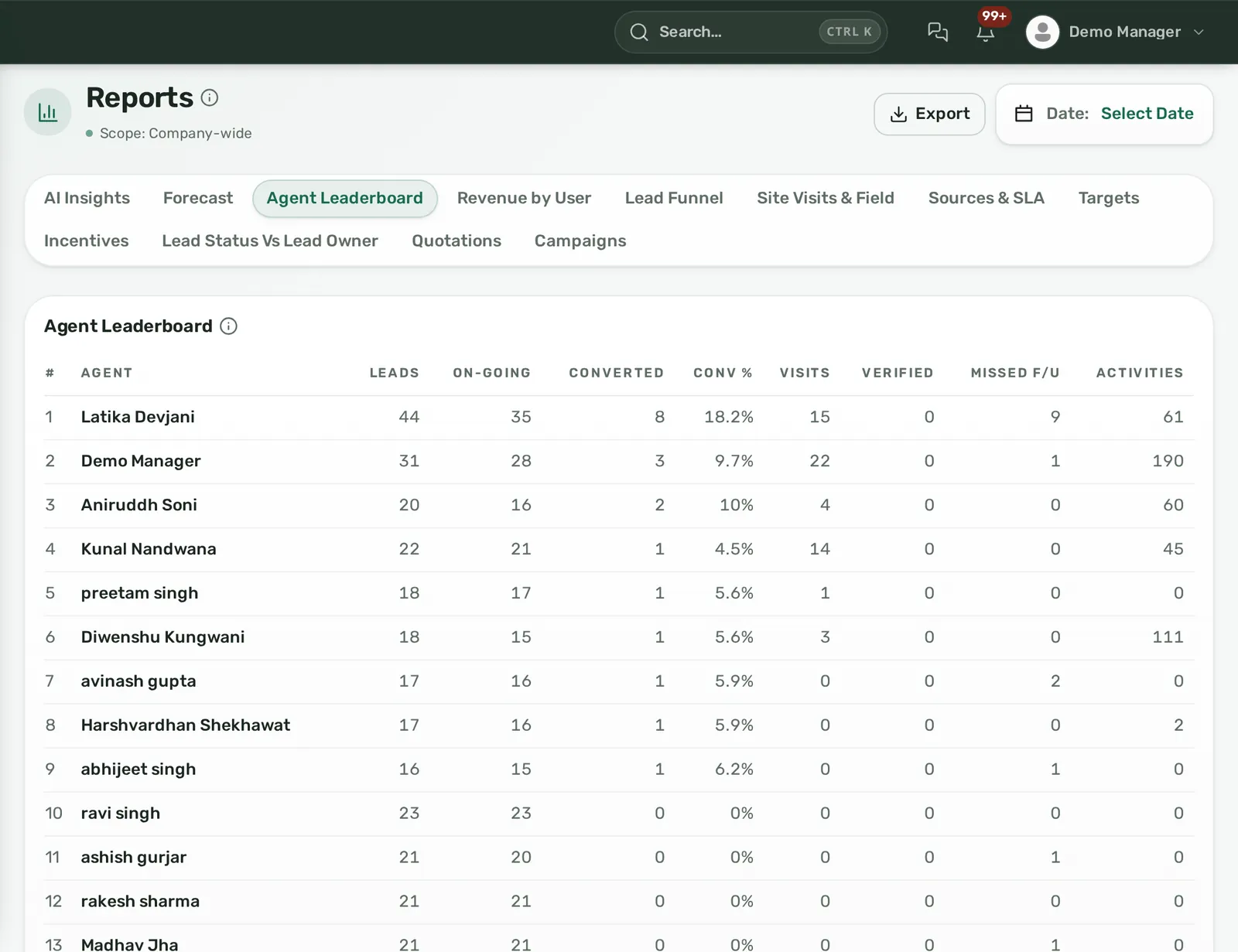
- Run a 20-minute Monday review. Open the agent leaderboard, the SLA report and the missed-follow-up list. Each team lead names the two leads they will personally rescue this week. Export the table and post it in the team channel so the numbers are the same for everyone.
- Let agents see their own row first. When an agent logs in, their dashboard should show their own SLA, overdue follow-ups, visits and target attainment. People fix numbers they can see every morning.
Illustrative example. A six-agent secondary-market brokerage sets a 30-minute SLA and a target of four bookings per agent per month. In week one the leaderboard shows one agent with 11 bookings-worth of pipeline but 14 overdue follow-ups and a 45% SLA rate. The team lead reassigns six stale leads to a newer agent with capacity, keeps the hot ones with the original agent, and checks the Monday after. Overdue count falls to three; two of the reassigned leads book viewings. Nothing about the marketing spend changed.
How should role scopes work so agents see only their own data?
Agent attrition in Dubai is high and the lead list is the brokerage's main asset. Scopes protect it without slowing anyone down.
- My: an agent sees the leads assigned to them, their own calls, visits, quotations, bookings and the commission lines in their name. Nothing about colleagues.
- Team: a team lead sees the same for everyone who reports to them, plus the team leaderboard.
- All: owners and heads of sales see every branch and every agent.
- Finance: sees commission receivable and payable across the company, but not salaries or ID documents unless HR access is granted separately.
Build these as permission templates (Agent, Team Lead, Finance, Owner) and apply them in bulk, rather than editing each person by hand. Two further controls matter: an audit log that records who changed a lead's assignment, stage or commission line, with the before and after values, and an offboarding action that transfers an agent's leads to a successor and deactivates the login in one step. Both remove the ambiguity that otherwise turns into a dispute when an agent leaves mid-deal. For the broader controls to look for, see the security page.
How do you tie commission due and received to each deal?
Commission tracking fails when it lives in a spreadsheet updated after the fact. The fix is structural: the commission record is created with the booking and carries its own status.
Define the formula at booking time
Every booking should carry a commission basis: a percentage of the deal value, a fixed AED amount, or, for leasing, a number of days or months of rent. Record it when the booking is created, not when the invoice is raised, so the forecast report can show expected commission while the deal is still in progress.
Record the legs separately
A single deal usually has more than one commission line:
- Receivable: what the developer (off-plan) or seller or landlord (secondary and leasing) owes the brokerage.
- Payable to the agent: the agent's share under their plan.
- Payable to a referrer or partner: a referring agent, external broker or client who introduced the lead.
Each leg has its own agreed amount, due status and paid status. The owner view is then simple: commission agreed, commission received, commission paid out, and the gap between them.
Let cancellation void the due amount
Off-plan cancellations and failed secondary transfers happen. If the booking is cancelled, the due commission on every leg should be voided automatically, and any amount already paid out should show as a refund line against the agent. This is the step spreadsheets reliably miss, and it is why year-end commission reconciliations drag on.
Worked example (illustrative)
An agent closes a secondary apartment at AED 2,000,000 with a 2% brokerage fee of AED 40,000 receivable from the buyer. The agent's plan pays 50% of brokerage received, and an external referrer was promised 10%. The booking carries three lines: AED 40,000 receivable (status: due), AED 20,000 payable to the agent (status: agreed, becomes due on receipt), AED 4,000 payable to the referrer (status: agreed). When the AED 40,000 arrives and is marked received, the two payable lines become due; finance pays them and marks each paid. The agent's dashboard shows AED 20,000 earned this month; the owner's commission summary shows AED 40,000 received and AED 24,000 paid. If the transfer had collapsed before completion, all three lines would be voided with a reason in the audit log.
For Dubai, keep the deal file's registration stages (SPA, Oqood for off-plan, DLD transfer and title deed for secondary) alongside the commission lines, because developer commission terms are usually written against those milestones. Refer to the Dubai Land Department for current registration procedures and broker requirements.
What mistakes do brokerages make with agent dashboards?
- Ranking by lead count. It rewards hoarding. Rank by conversion and attainment; show lead count as context.
- Counting commission as earned at booking. Cash arrives weeks later and sometimes never. Show agreed, received and paid as three numbers.
- Shared logins. One shared account means no per-agent numbers and no audit trail. Every agent needs their own seat and scope.
- No time filter on targets. A quarter-to-date leaderboard in week one of the quarter tells nobody anything.
- Ignoring the reporting line. If team leads cannot see their own team's overdue follow-ups, the review meeting becomes the owner reading numbers at people.
- Dashboards without a next step. A list of missed follow-ups should open the lead and let the manager reassign it from the same screen. Reports that only report get ignored. The real estate CRM analytics dashboard guide covers how to read these views together.
How Homelead handles agent performance and commission tracking
Homelead's Reports section includes agent, targets, revenue, funnel, lead source, status by owner, site visits, SLA, quotations, forecast, campaign and incentives reports, each exportable to CSV or XLSX, plus a per-user Call Logs report. The dashboard is role-scoped, filters by branch and date range, shows commission due and received, hot leads, site visits, follow-up reminders and missed follow-ups, and lets a manager view it as any team member. Each user saves their own widget layout.
The first-response SLA is set in minutes (1 to 1,440) with actions on breach: notify the assignee, escalate to the manager, flag the lead red, or auto-reassign, with an optional daily digest. Needs Attention lists each agent's fresh no-contact, overdue and missed follow-ups with a next best action. The Property Visits screen filters by team member, project, status and date, and unmarked visits can be flagged missed.
Visibility is My, Team or All by reporting line, with a permission grid of 120+ module-action rows, reusable templates such as Telecaller or Branch Manager, and bulk application. The Audit Logs screen records who changed what with before and after values across leads, assignments, bookings and commission payments. Offboarding transfers all of an agent's leads to a successor and frees the seat in one action.
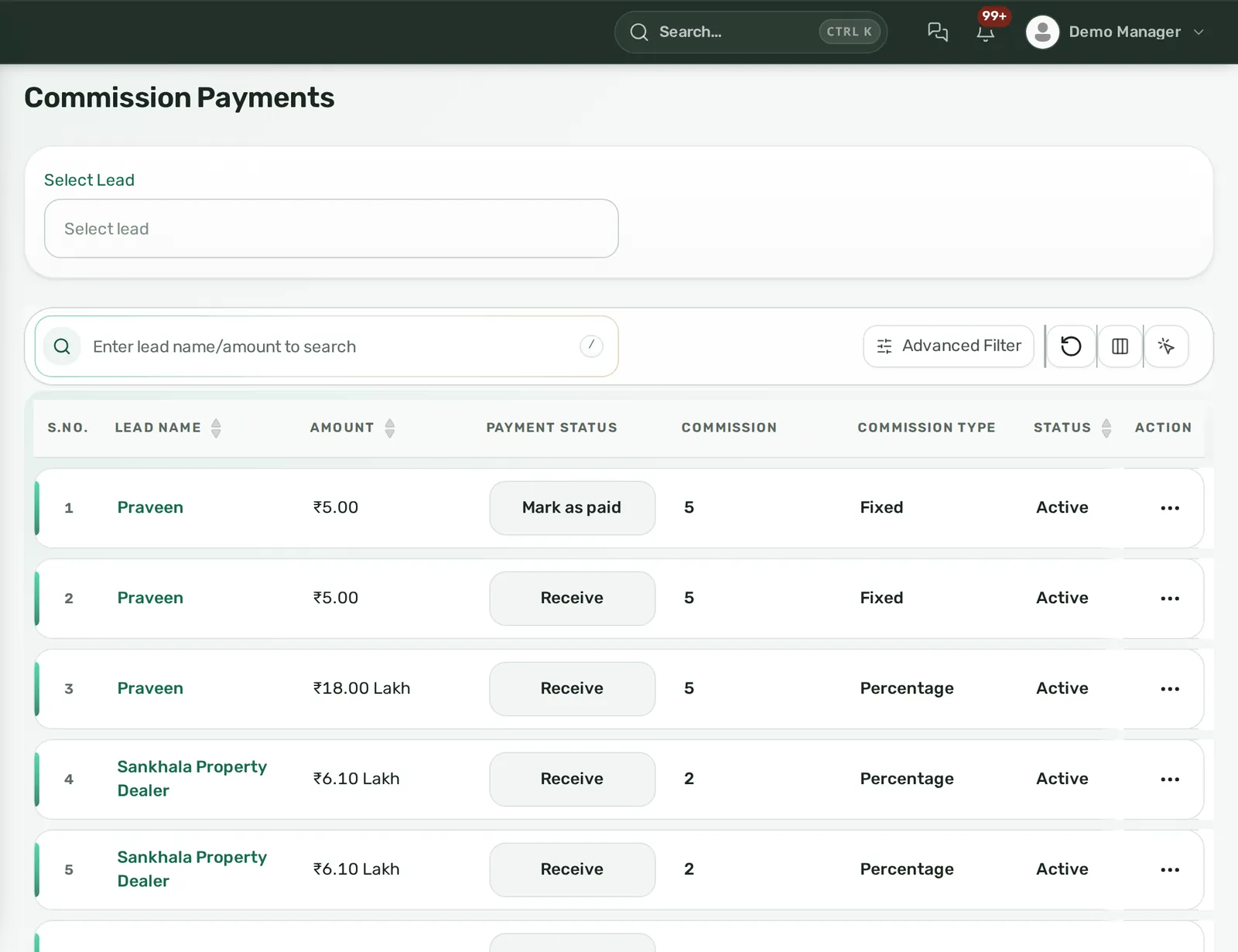
Commission uses one formula everywhere: percentage of deal, fixed amount, or days or months of rent, across three legs (owner, lead or buyer, and reference), each separately payable. Finance → Commission shows agreed versus paid, receivable versus payable, mark as paid, refunds and a summary, scoped to the user's role; a cancelled booking voids the due commission. Every booking gets a deal file with UAE stages such as Oqood, DLD and Title Deed, each time-stamped with the user, and UAE agent RERA number and card expiry are stored in Homelead. UAE accounts are invoiced in AED; see pricing for plans. To see these reports on your own bookings, book a demo or WhatsApp +91 72400 44472.
Frequently asked questions
What should a real estate agent performance dashboard show?
Per agent: first-response time against an SLA, overdue and missed follow-ups, site visits booked and completed, conversion by lead source, and bookings or AED booked against target. Call and WhatsApp activity counts sit underneath as explanation, not as goals.
How do I stop agents seeing each other's leads?
Use a CRM with visibility scopes tied to the reporting line: agents see My, team leads see Team, owners see All. Apply permissions through templates, give every agent their own login, and keep an audit log of assignment changes.
How should commission be tracked per deal?
Create the commission record with the booking: a formula (percentage, fixed, or months of rent), separate legs for what is receivable from the developer or seller and what is payable to the agent and any referrer, and a status that moves from agreed to due to paid. Cancelling the booking should void the due amount automatically.
Should agents be ranked by number of leads?
No. Lead count rewards hoarding. Rank by conversion rate, target attainment and SLA compliance, and show lead count only as context.
How often should a Dubai brokerage review agent numbers?
Weekly for performance (a short Monday review of the leaderboard, SLA breaches and missed follow-ups) and monthly for commission reconciliation against the ledger.
Can one dashboard cover off-plan, secondary and leasing agents?
Yes, as long as targets and conversion are filtered by deal type. The cycle lengths differ enough that a blended number misleads; keep the views separate and compare each agent against the target for their segment.