Homelead is a real-estate CRM built for builders, developers, brokers and channel partners in India and the UAE: portal and Meta leads in one inbox, calls from the team's own phones recorded and summarised by AI, a WhatsApp bot that answers from your brochures, live unit inventory, CLP collections and a three-leg commission engine, all in one subscription. HubSpot CRM is a general-purpose customer platform sold as separate hubs and tiers. For a team that lives on 99acres, Property Finder, WhatsApp and site visits, Homelead does the real-estate work out of the box; on HubSpot the same work has to be modelled, bought as higher tiers or added through outside tools.
Key takeaways
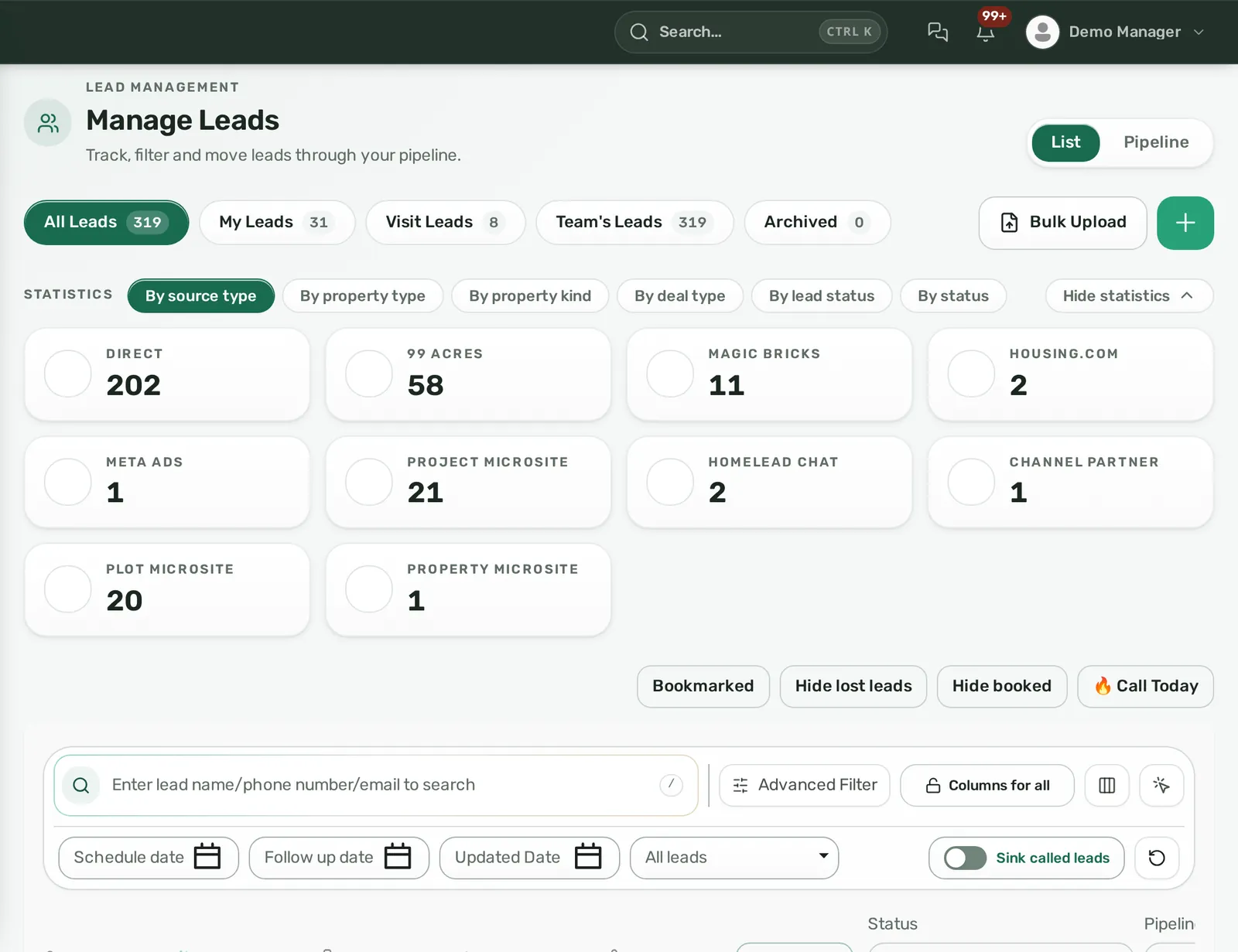
- Homelead receives 99acres, MagicBricks, Housing.com, PropTiger, Square Yards, OLX and Meta Lead Ads leads into one inbox with duplicate flagging, automatic assignment and an enforced first-response SLA.
- Calls from the team's own phone and SIM are logged, recorded and summarised by AI in Hinglish, with no IVR or cloud telephony to buy.
- The WhatsApp AI bot answers from your own brochures and price sheets and updates the lead itself; WhatsApp automation is included in every Homelead plan.
- Builders get live tower, unit and plot inventory, CLP payment plans, demand letters, collections and channel-partner commissions without custom objects or add-ons.
- Homelead pricing is published per user from ₹2,299 (or $24.99) with pay-as-you-go AI.
What are HubSpot CRM and Homelead?
HubSpot describes itself as a customer platform made of several hubs (Marketing, Sales, Service, Content, Data and others) with a free CRM and paid Starter, Professional and Enterprise tiers, positioned by company size rather than by industry (HubSpot Sales Hub pricing guide). It is a horizontal product used across many industries.
Homelead is built only for real estate. Its lead objects carry budget, BHK, locality and property type; its inventory objects are towers, floors, units and plots; its finance objects are bookings, instalments, demand letters and commission legs. Everything in this article about Homelead comes from the live product; everything about HubSpot comes from HubSpot's own pages or community answers, linked where used, or is framed as a question to put to HubSpot before you sign.
How does each CRM capture portal, Meta and WhatsApp leads?
A real-estate team's lead flow is lumpy and multi-source: a 99acres push at 11 pm, a Meta form from a weekend campaign, a WhatsApp message from a hoarding QR code, a walk-in at the site office. The CRM has to receive all of it without an agent copying numbers from an email.
Homelead: every source in one inbox with dedup and an SLA
Homelead has ready webhooks for 99acres, MagicBricks, Housing.com, PropTiger, Square Yards and OLX. Setup is one-time: Homelead gives you the webhook URL and key, the portal's account manager switches on the push, and leads arrive in real time with source and sub-source on each record (lockable). Meta Lead Ads connect through your Facebook Page; the form name is saved as the sub-source, older leads can be back-filled, and click-to-WhatsApp ads carry the ad id. Google Ads lead forms, Zapier and any other tool post to a generic webhook with field mapping, and a partner API key lets call centres and vendors push leads directly.
Duplicates are never silently dropped. A second enquiry from the same phone number is created, flagged as a duplicate and linked to the original, so you can see that one buyer enquired on two portals and still count sources correctly. Merging keeps the full history.
Assignment is automatic per source with five strategies: round robin, percentage split, capacity balance, fixed daily cap, or parameter-based (city, budget, custom field). A Rotation Log records every pick and the reason it fired. A first-response SLA (default 60 minutes, configurable from 1 to 1,440) warns the assignee before the deadline and, on breach, can notify them, escalate to their reporting manager, flag the lead red or auto-reassign it. This is what turns 'we respond fast' from a slogan into a rule the system enforces. The setup is covered step by step in 99acres, MagicBricks and Housing.com lead integration.
What to ask HubSpot
HubSpot's ads tool syncs Facebook lead-ads leads once an ads account and page are connected (HubSpot: syncing Facebook leads). For Indian and UAE property portals, ask HubSpot which, if any, have a ready connector, how duplicates from two portals are linked rather than dropped, and how a first-response deadline with manager escalation is enforced at the tier you are quoted.
How are sales calls recorded and summarised?
Homelead: own phone, own SIM, AI summary, no IVR
Telecallers and closers keep calling from their own phones with the normal dialler and whichever SIM the company gives them. The Homelead app syncs call logs every 15 minutes and whenever it opens, uploads the recording, and AI writes a speaker-wise transcript, a summary, a disposition and a next step on the lead, in Hindi, English or mixed Hinglish. Incoming calls show a caller-ID popup with the lead's name and owner before the agent answers. Personal contacts can be excluded so family calls never reach the CRM.
The automatic update has guardrails: the call must be answered, run at least 10 seconds, produce a transcript of more than 15 words and show interest or a callback request; stage and follow-up then move forward only, never out of won or lost, and never over a change a human made after the call started. An interested call from an unknown number can create a new lead on its own.
Managers listen to recordings and read transcripts inside the lead, and get a per-user Call Logs report. Calling Mode queues fresh leads, due follow-ups, not-connected numbers and visits to confirm, with optional auto-dial, and keeps daily dialled, connected and talk-time counts. Transcription and AI summary are metered from the wallet (default ₹1 per minute; exact rates sit on the Wallet screen) and are free when you plug in your own speech-to-text key. Nobody buys an IVR, a virtual number or a 'press 1' menu to get this.
HubSpot
HubSpot's guide lists automatic call recording, transcription and coaching ('conversation intelligence') as an Enterprise feature at $150 per seat per month, with a monthly calling-minute allowance per tier (HubSpot Sales Hub pricing guide). Ask HubSpot whether calls placed from an agent's own SIM in India or the UAE are captured at all, and whether transcripts handle Hinglish.
How does WhatsApp work in each CRM?
Homelead: official API, shared inbox, AI bot, templates, in every plan
WhatsApp is the primary channel for Indian and Gulf buyers, so Homelead treats it as core rather than an add-on. You connect your own number through Meta's embedded sign-up inside the panel (several numbers per account, an owner per number), and every conversation lands in a shared team inbox linked to the lead. Replies inside Meta's 24-hour window are free-form; outside it, approved templates are used.
The WhatsApp AI bot answers inbound messages instantly from your own Knowledge Center: brochures, price sheets, Word and Excel files, web links, and property and inventory records that sync automatically. It answers project, price, location, amenity, availability and document questions, classifies intent and temperature, and updates the CRM itself: disposition, status, follow-up date, pipeline stage, site-visit booking, document shared. Risky moves become proposals a human approves. When the buyer is hot or asks for a person, the bot assigns a live agent and pauses; any agent can click Takeover. It is off by default per number and has a dry-run tester, so you go live only when the answers are right. It replies through the night, which is when many portal and Meta enquiries actually arrive.
Templates are drafted with AI inside the panel in Hindi and 70 other languages, with Meta approval status syncing automatically. No-code automation rules send templates on lead created, status change, idle N days, site visit, booking or date anchors, and campaigns go to filtered lead lists or uploaded sheets with a delivered, read and failed funnel. The full workflow is in WhatsApp CRM for real estate.
HubSpot
HubSpot's documentation states that connecting a WhatsApp Business Account to the conversations inbox requires Marketing Hub or Service Hub Professional or Enterprise, and that historical conversations are not synced (HubSpot: connect WhatsApp to the inbox). A HubSpot community answer states that HubSpot does not offer native WhatsApp bulk messaging (HubSpot Community). For a Sales Hub buyer, WhatsApp is therefore a second hub purchase; ask HubSpot for the total and whether an AI bot answering from your brochures is part of it.
Can the CRM run builder inventory, CLP payment plans and collections?
Homelead builder panel
Developers on Homelead work in a Builder panel that models the project the way the site office thinks about it: towers, floors and units, or plots on a map. AutoCAD DXF/DWG or vector PDF layouts become clickable live-status maps. Units carry Available, Hold, Temporary Booked, Booked, Allotted and Sold states; booking a Sold or Allotted unit is refused, so double booking cannot happen, and every hold and release is logged with history. Channel partners request access to your stock through Shared Inventory and see live status once you approve.
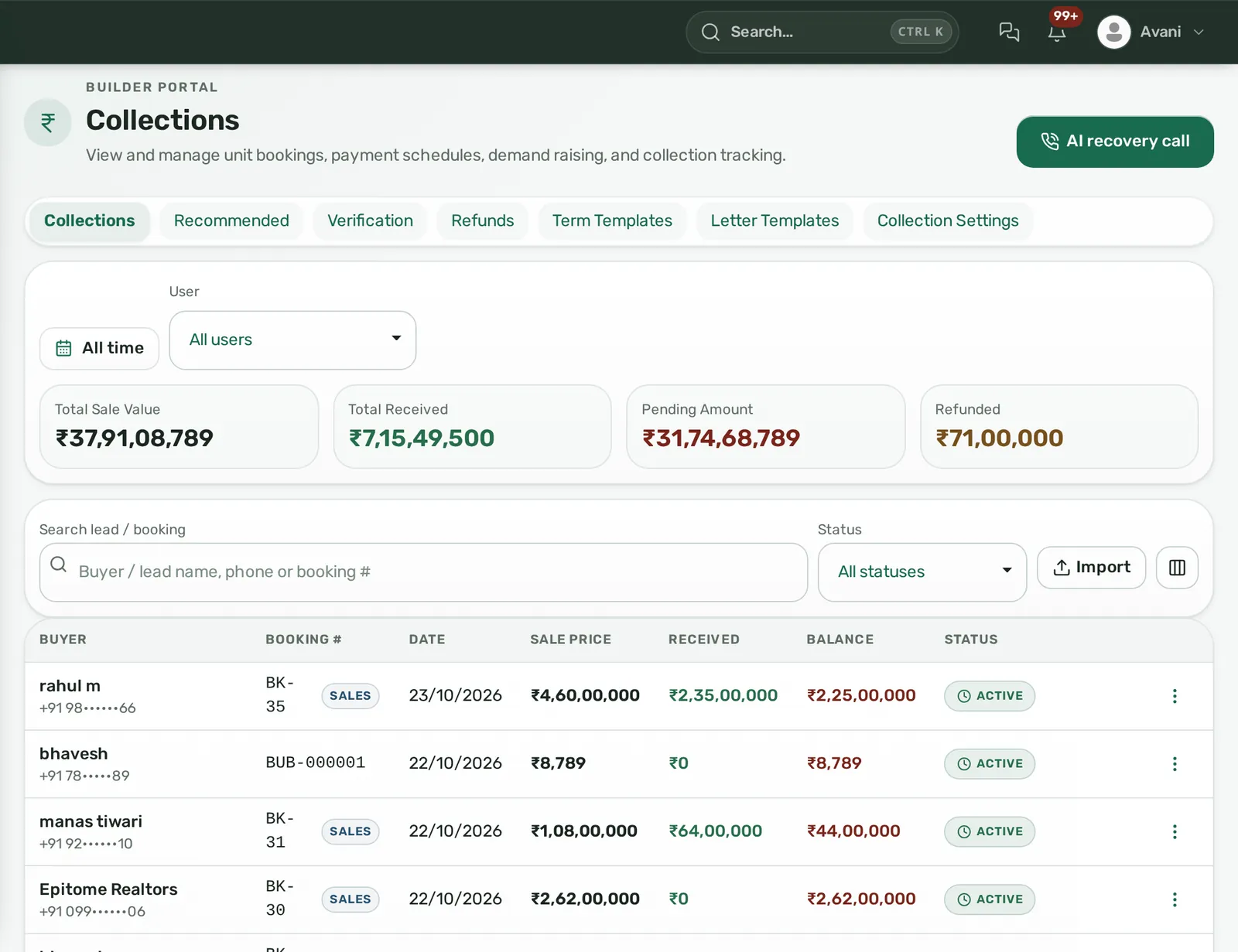
Post-sales is where a generic CRM runs out of road. Homelead has construction-linked, time-linked and hybrid payment plans built from templates (for example 20:80 with due offsets by customer category) or customised per booking. Completing a construction phase raises the due lines, and demand letters go out per line or in bulk by email, WhatsApp and a no-login link that shows the instalment with a PDF and a Pay Now button through your own Razorpay or Easebuzz account. Online payments are recorded automatically; cash, cheque and bank transfers are entered with references and an optional finance verification step. Overdue instalments trigger reminders every N days, late-payment interest can be switched on after a grace period, a bounced cheque is marked with its charge, home-loan sanctions and disbursements sit on the booking, and a cancellation computes the refundable amount after a configurable charge and voids any due commission. Collections dashboards show received, pending and refunded by project and date, and each buyer gets a statement PDF.
HubSpot
HubSpot's pricing guide lists custom objects, the feature for modelling records outside contacts, companies, deals and tickets, as Enterprise-only (HubSpot Sales Hub pricing guide). Ask HubSpot how you would represent a tower of 240 units with live status, a CLP schedule that raises demands when a slab is cast, and a refund with cancellation charges, and who would build and maintain that configuration.
How are channel-partner and broker commissions tracked?
Real-estate money splits three ways more often than not: the owner or developer pays, the buyer-side agent earns, and the person who referred the lead expects a share. Homelead's commission engine uses one formula everywhere (percentage of deal, fixed amount, or days or months of rent) and tracks three legs per booking: owner, lead and reference, each separately payable. Finance → Commission shows agreed versus paid and receivable versus payable, lets you mark a leg paid or refunded, and respects user scope so an agent sees only their own. Builders keep a Channel Partners master with commission percentage and project allocation. If a booking is cancelled, due commission is voided automatically, which closes the most common dispute between developers and partners. The onboarding-to-payout flow is in channel partner management for builders.
Ask HubSpot how a three-party commission on a single deal would be recorded, voided on cancellation and reported per partner.
Does one system work for both India and the UAE?
Homelead is built for both India and the UAE. Indian accounts get portal webhooks, DLT-registered SMS from inside the CRM, GST on quotations and a deal-file checklist that reminds you of TDS under section 194-IA on resales of ₹50 lakh and above. UAE accounts are invoiced in AED, get a bilingual FTA tax invoice, store the agent's RERA number and card expiry, push listings to Property Finder and feed Bayut and dubizzle, and run deal files with Oqood, DLD and Title Deed stages. The web panel is available in English and Arabic, and the AI replies in Hindi, Hinglish, English or Arabic depending on the buyer. See Homelead for India and the UAE.
Ask HubSpot about Hindi or Arabic interface support and India- or UAE-specific compliance fields; neither appeared in the pages we reviewed.
What does each CRM cost for a 20-person sales team?
Homelead publishes its prices: Growth ₹2,299 per user per month from 10 users, Pro ₹2,099 from 20, Scale ₹1,799 from 50, Enterprise ₹1,499 from 100 (in USD $24.99, $22.99, $18.99 and $16.99; UAE invoiced in AED; Indian prices exclude 18% GST). A quote is capped at the next band, so 19 users never pay more than 20. Every plan includes lead capture and portal integrations, property, project and land management, microsites, site visits, bookings, broker management and commissions, ledger and collections, rent, WhatsApp, SMS and email automation, reporting, the mobile app and attendance. AI voice minutes, AI replies, transcription and message sends are pay-as-you-go from a wallet with no flat AI fee, and annual billing lowers the rate. Details on Homelead pricing.
Illustrative example: a 20-person Indian sales team on Homelead Pro pays ₹41,980 per month plus GST, with AI usage on top only as consumed. On HubSpot, using the per-seat figures in HubSpot's own guide, 20 Sales Hub Professional seats are $90 each per month on annual billing ($1,800 per month) plus a one-time $1,500 onboarding fee; call transcription sits at Enterprise, $150 per seat with a $3,500 onboarding fee; and native WhatsApp needs a separately priced Marketing or Service Hub Professional or Enterprise subscription (HubSpot Sales Hub pricing guide; HubSpot: connect WhatsApp). Confirm current figures on HubSpot's pricing page before deciding; the point is that Homelead's price already contains the real-estate work.
Homelead vs HubSpot CRM at a glance
| Criterion | Homelead | HubSpot CRM |
|---|---|---|
| Indian portal leads (99acres, MagicBricks, Housing.com, PropTiger, Square Yards, OLX) | Ready webhooks, real-time, source and sub-source recorded (lockable) | Ask HubSpot |
| Meta Lead Ads | Page connect, form name as sub-source, back-fill of older leads | Facebook lead-ads sync via ads tool (source) |
| Duplicates and routing | Flagged and linked, never dropped; 5 auto-assign strategies with Rotation Log | Ask HubSpot |
| First-response SLA | Configurable minutes; warn, escalate to manager, flag, auto-reassign | Ask HubSpot |
| Call recording and AI summary | Own phone and SIM; Hinglish transcript, summary, disposition, next step; no IVR | Conversation intelligence listed at Enterprise, $150/seat/month (source) |
| Official API, shared inbox, AI bot from your brochures, templates in 71 languages, in every plan | Native channel requires Marketing or Service Hub Pro/Enterprise (source) | |
| Builder inventory and plot maps | Towers, floors, units, DXF/DWG plot maps, double booking blocked | Custom objects Enterprise-only (source) |
| CLP, demand letters, collections | Built in: Pay Now links, overdue reminders, interest, loans, refunds | Ask HubSpot |
| Commission | Three legs per deal, voided on cancellation, partner master | Ask HubSpot |
| India and UAE | India: portal webhooks, DLT SMS, GST; UAE: AED, FTA invoice, RERA fields, DLD stages; English and Arabic panel | Ask HubSpot |
| Pricing | Published per user from ₹2,299 / $24.99; pay-as-you-go AI | Sales Hub Pro $90/seat annual + $1,500 onboarding; Enterprise $150/seat + $3,500 (source) |
Who gets the most from Homelead
- Developers with live projects who need units, CLP schedules, demand letters and collections in the same place as their leads and channel partners.
- Brokerages running telecalling teams on portal and Meta leads, where first-response time and call quality decide the month, and nobody wants to buy an IVR to see what was said.
- Channel partners who need live builder stock, booking requests and three-leg commissions tracked per deal.
- Firms with India and UAE operations that want AED invoicing, RERA and DLD fields and Arabic-capable AI.
The verdict: for a real-estate team in India or the UAE, Homelead is the better choice because the work you do every day (portal leads, calls, WhatsApp, inventory, collections, commissions) is already in the product and already in the published price. A sales head should not have to model towers in custom objects or buy a second hub to get a demand letter out on WhatsApp.
Moving to Homelead from HubSpot or spreadsheets
Migration is a sheet, not a project. Export your leads to Excel or CSV, download Homelead's sample template, and import: column matching is tolerant, every row returns success or a failure reason, and you can round-robin assign while importing, up to 50,000 rows per file. Properties, projects and builder units have their own bulk templates, so inventory comes in the same way. Role templates (Telecaller, Branch Manager and so on) apply to many users at once through Bulk Permissions, and the org tree sets reporting lines so My, Team and All visibility works from day one. Portal webhooks are switched on with each portal's account manager, your WhatsApp number connects through Meta's embedded sign-up, and the same team that runs your demo does your onboarding.
Book a demo on your own inventory
A Homelead demo is about 20 minutes on a screen-share. Send your inventory sheet beforehand and you will see your own towers, plots and prices in the panel rather than sample data. Book a demo, WhatsApp +91 72400 44472 or email [email protected].
Frequently asked questions
Is HubSpot CRM built for real estate?
HubSpot positions its tiers by company size (individuals, small teams, mid-sized teams, large distributed teams) rather than by industry, according to its own Sales Hub pricing guide (https://blog.hubspot.com/sales/hubspot-sales-hub-pricing), and it is a general-purpose platform used across many sectors. Homelead is built only for real estate, with units, plots, CLP schedules, demand letters, site visits and commission legs as native objects.
Does Homelead need an IVR or cloud telephony to record calls?
No. Agents call from their own phone and SIM with the normal dialler. The Homelead app syncs the call log, uploads the recording and AI writes the transcript, summary, disposition and next step on the lead. Transcription is metered per minute from the wallet, or free with your own speech-to-text key.
Is WhatsApp included in every Homelead plan?
Yes. Every plan includes WhatsApp, SMS and email automation. You connect your own number through Meta's official API inside the panel, use a shared inbox, create templates with AI in 71 languages and can switch on the AI bot per number. Meta's own conversation charges and per-message wallet usage apply.
Can Homelead handle construction-linked payment plans and demand letters?
Yes, in the Builder panel. Payment plans are construction-linked, time-linked or hybrid; completing a construction phase raises the due instalments; demand letters go by email, WhatsApp and a Pay Now link through your own Razorpay or Easebuzz account; overdue reminders, late-payment interest, cheque bounce charges, loans and cancellations with refunds are all tracked.
Does Homelead work for both India and UAE teams?
Yes. Homelead is built for both markets: Indian accounts get portal webhooks, DLT SMS and GST on quotations; UAE accounts get AED invoicing, bilingual FTA tax invoices, agent RERA numbers and DLD deal-file stages. The web panel is available in English and Arabic.
How do I move my leads and inventory into Homelead?
Export them to Excel or CSV and import with Homelead's sample template. Rows are matched tolerantly, each row reports success or a reason for failure, assignment can be round-robin during import, and files go up to 50,000 rows. Properties, projects and builder units have their own bulk templates.