A real estate ERP for builders runs the cost side of a project: procurement, contractor bills, material stores, project costing and the statutory books. A real estate CRM runs the revenue side: leads, site visits, unit inventory, bookings, payment plans, demand letters, collections and channel-partner payouts. Most Indian builders with one to three projects need a CRM with a proper post-sales module plus the accounting package they already use; a full ERP earns its cost only when procurement and contractor management across several sites becomes the bottleneck.
Key takeaways
- A CRM handles everything with a buyer or broker on the other side; an ERP handles everything with a vendor, contractor, bank or auditor on the other side.
- Collections, unit inventory and construction milestones are the grey zones. Decide one owner for each before you buy anything.
- One-project builders rarely need an ERP. Ten-project builders rarely survive without one. In between, the deciding factor is whether procurement and contractors are run in-house.
- Never let the same receipt be typed twice. Record it in the system the team uses and post it to the books once.
What is the difference between a real estate ERP and a CRM for builders?
The cleanest test is to ask who is on the other side of the transaction. If it is a buyer, a prospective buyer or a channel partner who brought one, the work belongs in the CRM. If it is a vendor, a contractor, a bank or your auditor, it belongs in the ERP or the accounting package. Everything else is a grey zone, and the grey zones are where builders waste money.
What a CRM owns for a builder
A builder's CRM starts at the first enquiry and should run until the last instalment is collected: portal and ad leads, telecalling and follow-ups, site visits, the live unit grid with holds and bookings, quotations and cost sheets, KYC, construction-linked payment plans, demand letters, receipts and buyer statements, cancellations and refunds, and the commission owed to brokers and channel partners. The common thread is that a customer record sits at the centre of every screen.
What an ERP owns
An ERP starts at the estimate and runs until the project's books are closed: bill of quantities, purchase requisitions and purchase orders, material receipts and store stock, contractor work orders and running-account bills, retention money, budget versus actual cost per project, fixed assets, the general ledger, GST and TDS filings, and bank reconciliation. Here the project or cost centre sits at the centre, not the customer.
Why the word ERP confuses builders
Vendors stretch both labels. Some products sold as a real estate ERP for builders are an accounting package with a thin booking module; some products sold as a CRM carry payment plans, ledgers and commission payouts. The label tells you almost nothing. The module list, and who in your office will open it every morning, tells you everything.
Which modules belong in the ERP and which in the CRM?
| Module | Natural home | Why | Watch out |
|---|---|---|---|
| Lead capture, follow-up, site visits | CRM | Buyer-facing, changes hourly | Keep it out of the ERP entirely |
| Unit inventory and status (available, hold, booked, sold) | CRM | Sales team changes it; a double booking is a sales failure | ERP only needs sold count and value |
| Quotations and cost sheets | CRM | Negotiated with the buyer | ERP needs the agreed price, not the drafts |
| Bookings and KYC | CRM | Customer master lives here | ERP receives booking id, buyer, unit, value |
| Payment plans (CLP, time-linked) and demand letters | CRM post-sales | Tied to the booking and the buyer | Milestone completion is certified by the site team |
| Collections and receipts | CRM for the operational record; books for the ledger | Buyer asks the collections team, not the accountant | The biggest grey zone, see below |
| Channel partner and broker commission | CRM | Tied to a specific deal and its cancellation | Payout vouchers are posted in the books |
| Cancellations and refunds | CRM first, then books | Deduction logic depends on booking terms | Refund outflow must hit the ledger |
| Procurement, purchase orders, stores | ERP | Vendor-facing, quantity-based | A CRM has no reason to hold cement and steel |
| Contractor work orders, RA bills, retention | ERP | Measurement-based, progressive | Needs site measurement books |
| Project costing, budget vs actual | ERP | Rolls up every PO and bill | This is the real reason to buy an ERP |
| Construction progress | ERP or a site app | Feeds costing and contractor billing | The CRM only needs a milestone-complete flag |
| Statutory accounting, GST returns, bank reconciliation | Accounting package or ERP | Auditor-facing | Never run statutory books in a CRM |
| Attendance, payroll | Either | Depends on which app staff already carry | Field attendance often sits in the CRM app |
Use this table as a buying checklist. Any product that claims the whole left column should be asked to show the procurement screen and the demand letter screen in the same demo; one of them is usually thin.
Where do builders get confused?
Collections is the biggest grey zone
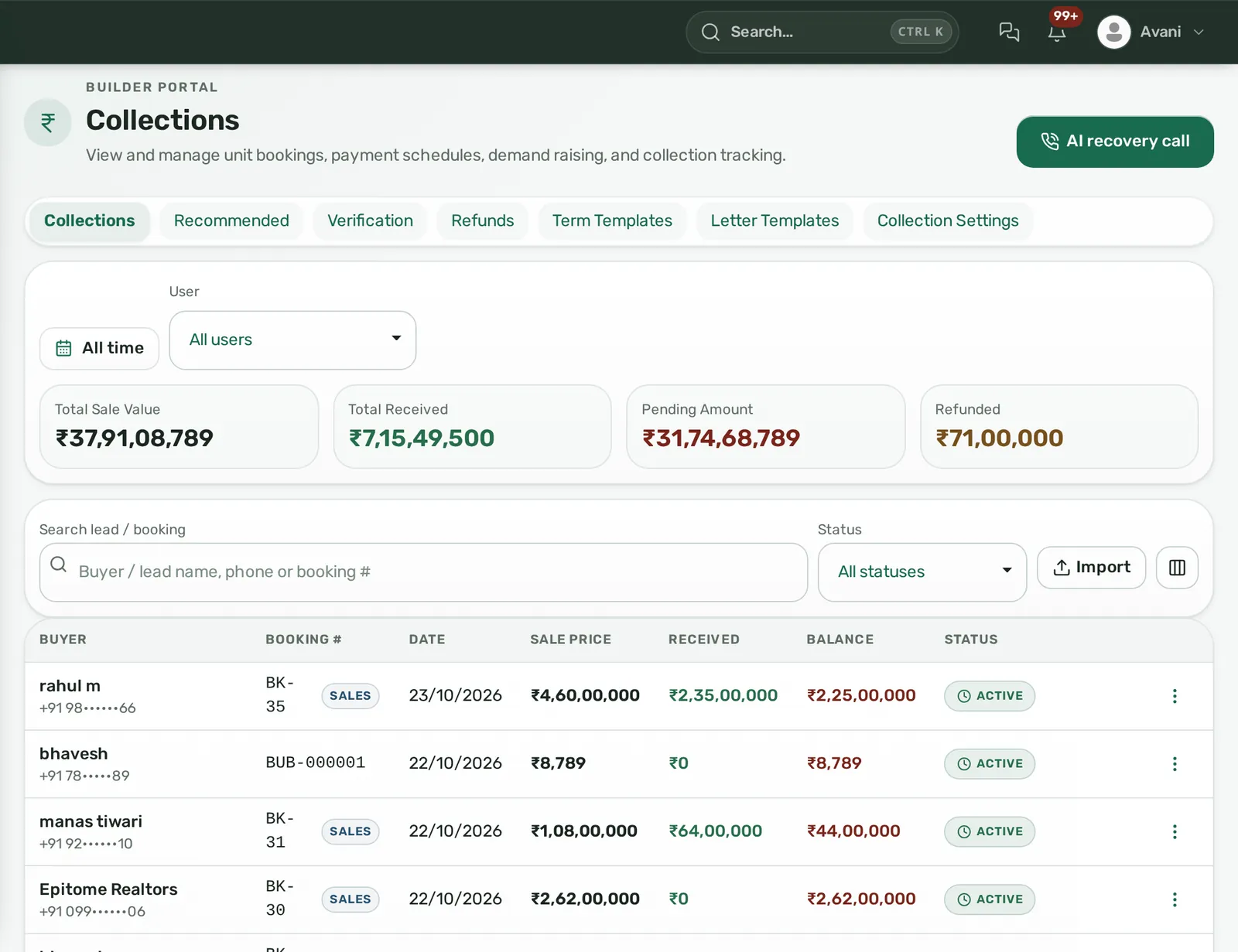
A receipt is two things at once: a customer event (the buyer paid instalment 4 and wants a receipt and an updated balance) and an accounting event (money came into the project account and must be posted). Builders go wrong when both systems try to own it. The collections executive types the receipt into the CRM; the accountant types it again into the books a week later; the two never match and the buyer gets a demand letter for an instalment already paid.
The working rule: record the receipt once, in the system the collections team actually uses, and post it to the books in a batch, by daily export or an API push. The accountant reconciles totals per project at month end rather than re-keying rows. Where RERA rules require a separate project account for a share of receipts, your accounting package handles the bank side; the CRM only needs to know which project the money belongs to. Check your state authority's rules through the Ministry of Housing and Urban Affairs.
Unit inventory is not material inventory
Both are called inventory. Unit inventory is flats and plots with a sales status; material inventory is cement bags and tiles in the store. A CRM owns the first; an ERP owns the second. A vendor that answers your inventory question with a stores module is talking about the wrong one.
A cost sheet is not project costing
The cost sheet is what the buyer sees: basic price, PLC, parking, GST, registration. Project costing is what the CFO sees: land, approvals, construction cost per square foot, finance cost. The first is a CRM document (see what a cost sheet is); the second is an ERP report.
Construction milestones have two readers
For a construction-linked plan, the moment the site engineer certifies that the fifth slab is cast, two things should happen: the ERP releases the contractor's RA bill, and the CRM raises demand letters for every booking with a line against that slab. Decide who ticks the milestone and which system the tick lives in. In practice the site team marks it in whichever app they have, and the other system either reads it or a manager mirrors it the same day.
Commission is not a contractor payment
Both are payables, both raise TDS questions, both end up in the books. But a commission belongs to a deal, is voided if the booking cancels, and often splits into legs (the broker, the referrer, sometimes a buyer cashback). A contractor bill belongs to a work order and a measurement. Keep commission logic in the CRM where the booking lives; see how broker commission legs and cancellations work.
Which problems are CRM problems and which are ERP problems?
Write down the three things that hurt most this quarter and sort them.
CRM-side problems
- Portal leads sit uncalled for a day and nobody knows who owns them.
- Two executives hold the same unit for two different buyers.
- Demand letters go out late, or to buyers who already paid.
- Nobody can say today how much is due across all bookings in a project.
- Channel partners chase payouts and you cannot tell what was agreed per deal.
- Cancellations are settled from memory; deductions differ buyer to buyer.
ERP-side problems
- The purchase team cannot say what was ordered versus what reached the site.
- Contractor bills get paid without a measurement check; retention lives in a diary.
- The project is over budget and you found out at year end.
- GST input credit on materials is reconciled by hand.
- Three projects, three accounting companies, no consolidated view.
If your list is mostly the first group, buy a CRM with real post-sales depth and keep your accounting package. If it is mostly the second group, you need an ERP, and the CRM question is separate. If it is both, buy in the order the pain demands and make sure the two talk.
What should a 1-project, 3-project or 10-project builder buy?
One project, up to a few hundred units
You almost certainly do not need an ERP. Your contractor runs procurement, your CA runs the books, and your real risk is on the revenue side: lost leads, held units, late demands, uncollected instalments. Buy a CRM whose builder module covers the unit grid, payment plans, demand letters, receipts, buyer statements and commissions. Export receipts and refunds to your accountant monthly. Track construction with photos and a milestone sheet; that is enough to drive the CLP.
Three projects, two or three sites running at once
Still CRM-first, but the ERP question becomes real if any of these are true: you buy major materials yourself, you run more than a couple of contractors per site, or you need budget versus actual per project without waiting for the audit. If none apply, a CRM with post-sales depth plus accounting still works. If two or three apply, add a project-costing or light ERP layer now, before the fourth project, because migrating purchase history later is painful. The non-negotiable at this stage is a single customer master: three projects must not mean three Excel files of bookings.
Ten projects, or an in-house contracting arm
You need an ERP for procurement, contractor billing, costing and consolidated books. The CRM stays as the revenue system from lead to final collection, and the question becomes integration: booking value and receipts flowing into the ERP, milestone completion flowing back. At this size, also insist on audit logs, role scopes by project and branch, and exports your internal audit team can pull without calling the vendor.
| Builder size | CRM with post-sales | Accounting package | ERP (procurement, costing) |
|---|---|---|---|
| 1 project | Yes | Yes, the existing one | No |
| 3 projects | Yes | Yes | Only if procurement and contractors are in-house |
| 10 projects | Yes | Usually inside the ERP | Yes |
How should a CRM and an ERP work together?
Four rules keep two systems from fighting:
- The CRM is the customer master. Buyer, unit, agreed price, payment plan and booking id are created once in the CRM. The ERP or accounting package receives them and never creates a customer on its own.
- Receipts flow one way, CRM to books. Daily or weekly, by export or API. The accountant posts; the CRM is not edited to match the ledger.
- Milestones flow from site to CRM. The ERP or site app certifies, the CRM raises demands. Agree who mirrors it if there is no live link.
- Unit status has one owner. Only the CRM moves a unit from available to booked to sold. The ERP reports on it.
Then set a reconciliation cadence: at month end, total received per project in the CRM must equal the project's receipt ledger in the books. Any gap is investigated that week, not at audit.
Illustrative example. A builder with two projects in Jaipur and 180 units uses a CRM for leads, inventory and collections and an accounting package for books. Each Friday the collections executive exports the week's receipts (booking id, buyer, amount, mode, reference) and the accountant imports them. The site engineer marks slab milestones on a shared sheet; the sales manager mirrors them into the CRM the same evening and demand letters go out on Monday. At month end the two totals are compared per project. There is no ERP, and nothing is missing from the workflow that an ERP would add, because the contractor handles procurement.
What mistakes do builders make when choosing?
- Buying the ERP first because the CA suggested it. The sales team never logs in, leads stay in WhatsApp, and the ERP's booking module becomes a monthly data-entry chore.
- Buying a sales-only CRM and running collections in Excel. Demand letters, receipts and refunds then live outside the customer record, which is exactly where buyers ask about them. Our walkthrough of CLP demand letters and collections shows what the post-sales half should look like.
- Double entry. If any amount is typed into two systems by two people, it will drift.
- Over-customising before data exists. Fix stages, plan templates and commission rules after one project has gone through them, not before.
- Ignoring the true cost. Per-user pricing, seat minimums, implementation and usage charges add up differently for a CRM and an ERP; read what hides in real estate CRM pricing and apply the same scrutiny to ERP quotes, where the implementation fee is often the larger number.
- Forgetting the unit grid. Towers, floors, units and plots with live status are the hinge between sales and collections. If a product cannot show it, the post-sales module will be built on a spreadsheet.
Where Homelead sits on this map
Homelead is the revenue-side system in this picture: a real-estate CRM with a Builder panel that runs from first enquiry to final collection. For builders in India it covers:
- Unit inventory: towers, floors, units and plots with Available, Hold, Temporary Booked, Booked, Allotted and Sold statuses; a booking on a sold or allotted unit is refused, so double booking is blocked; hold and release carry a history; plot maps from AutoCAD files become clickable live-status maps.
- Payment plans and demand letters: construction-linked, time-linked and hybrid plans; payment-term templates by customer category (for example 20:80); marking a construction phase complete raises the due lines, and demand letters go out per line or in bulk by email, WhatsApp and a shareable link with a Pay Now option.
- Collections: online payments through the company's own Razorpay or Easebuzz account are recorded automatically; offline cash, cheque and UPI/NEFT entries carry a reference, an optional finance verification step and a cheque clearance step; PDF receipts in your own format; buyer statements showing agreed, due, received and balance; configurable late-payment interest; cheque bounce charges; overdue reminders by email and WhatsApp.
- Cancellations, loans and commissions: cancellation with a configurable charge and a tracked refund; home loan tracking per booking with sanction and disbursement entries; a channel partner master with commission percentage and project allocation; commission legs for owner, buyer and reference, each marked paid separately and voided if the booking cancels.
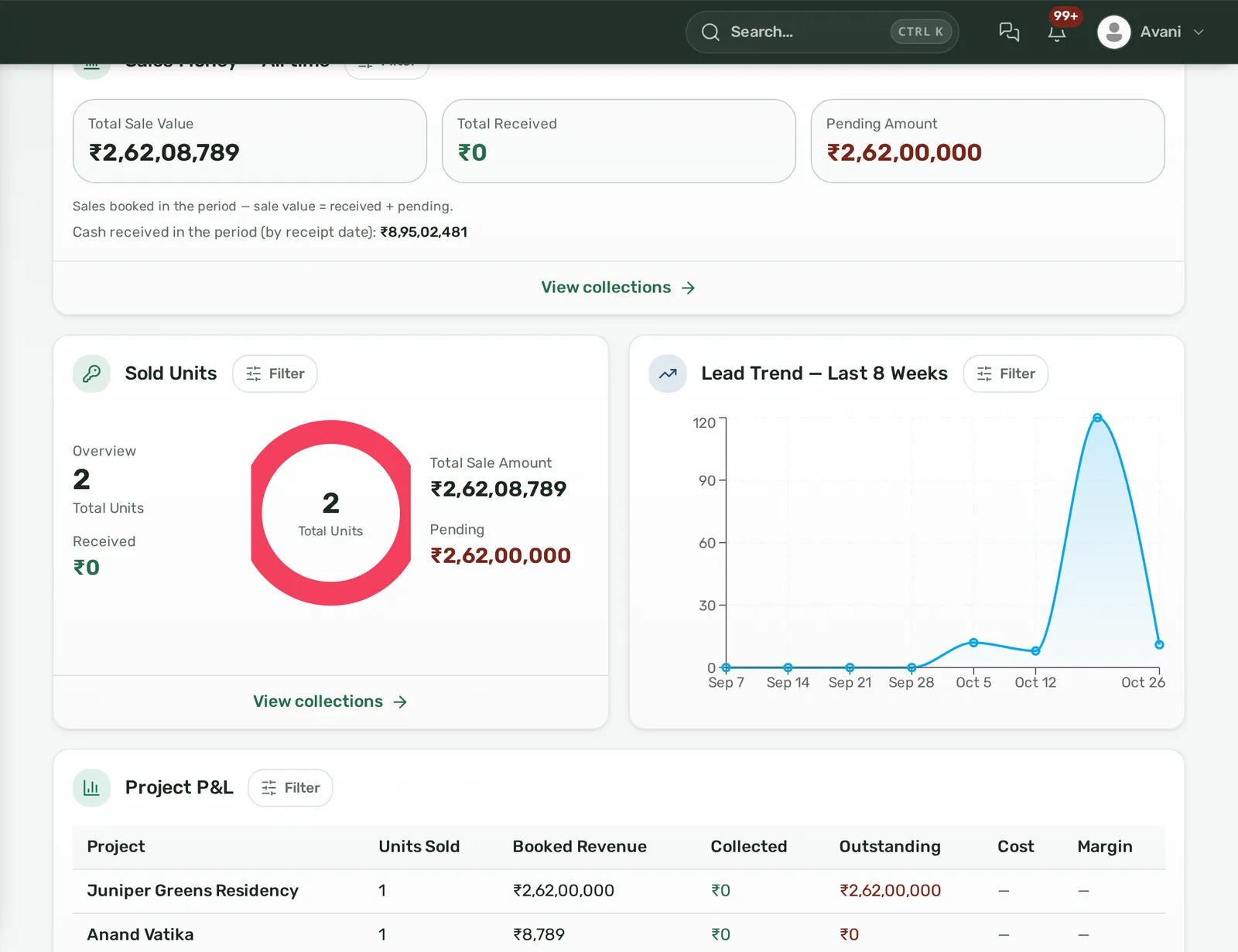
- Finance ledger: money in, money out, expenses and employee advances, filtered by project and branch, with statements exported as CSV or PDF for your accountant. The Builder panel also keeps procurement and contractor records for builders who want those entries beside their collections without buying an ERP.
- Controls: a deal file per booking with a stage tracker, fee breakdown and compliance checklist; audit logs recording who changed what with before and after values; role scopes by reporting line.
Pricing is per user per month with a minimum seat count per plan, from ₹2,299 per user on Growth (10 users) down to ₹1,499 per user on Enterprise (100 users), excluding GST; ledger, collections and expense tracking are included in every plan. Details are on the pricing page. A demo on your own inventory sheet takes about twenty minutes; book it here.
Frequently asked questions
Do builders need both an ERP and a CRM?
Not always. A builder with one to three projects whose contractors handle procurement usually needs a CRM with post-sales depth (inventory, payment plans, demand letters, collections, commissions) plus the accounting package they already use. An ERP becomes necessary when procurement, contractor billing and project costing across several sites are run in-house.
Can a real estate CRM replace accounting software?
No. Statutory books, GST returns and bank reconciliation belong in an accounting package or ERP. A CRM records the operational side of money, receipts against bookings, refunds and commissions, and should export those rows so the accountant posts them once rather than re-keying them.
Should demand letters come from the ERP or the CRM?
From the CRM, because a demand letter is addressed to a buyer and depends on that buyer's booking and payment plan. The ERP or site team certifies that the construction milestone is complete; the CRM uses that flag to raise the due lines and send the letters.
What is the difference between unit inventory and material inventory?
Unit inventory is your saleable stock: flats, plots and shops with a status such as available, held, booked or sold, owned by the sales team in the CRM. Material inventory is cement, steel and fittings in the site store, owned by the purchase team in the ERP. They share a word and nothing else.
At what size does a builder need an ERP?
The trigger is not project count alone but who buys materials and pays contractors. If you buy major materials yourself, run several contractors per site and need budget versus actual per project before the audit, you need project costing and procurement modules, typically around the third project. By ten projects an ERP is standard.
How do we stop receipts being entered twice?
Give the receipt one home: the system the collections team uses. Export or push receipts to the books on a fixed cadence, and reconcile total received per project at month end. Never let the accountant edit the CRM or the sales team edit the ledger to force a match.